
Linked Products
Article sections
Linked Products can be enabled for any inventory items you want to bundle together. For example, a custom-built PC comprises of CPU, Motherboard, Case, PSU, memory etc or simply an iPhone repair may comprise of the part (screen) and labour. If the cost of the screen changes, you can easily update the entire job cost without affecting the labour cost.
iPhone X Screen Replacement:
- iPhone Screen @ £60
- iPhone Labour @ £40
Total is £100
Linked products are identified in your inventory as bold.
How to Create a Linked Product

1 – Check “Linked Product”
2 – Open the “Linked Products” tab
On the Linked Products Tab

1 – Type your the name of an existing item in your inventory (tip: create your inventory first, finally, add into a linked product last).
2 – Your linked items will show in the display below
3 – Click Save
How to add a Linked Product to your ticket charges.
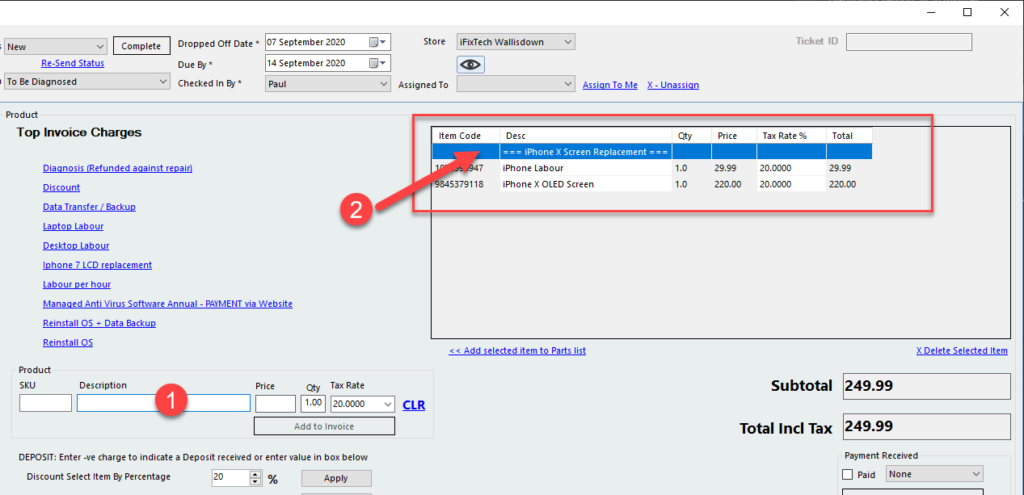
1 – Type the name of the Linked Product created above and click the “Add to Invoice” button.
2 – Your linked product will show in the charges area (SKU and title only) with the linked products displayed below.